I haven't blogged for ages - but that's not the point of this post. I recently had to quickly glance over a whole lot of legacy CF files and I didn't want to have to open each individual file in my preferred IDE. OS X supports quick look by hitting the space bar in finder for a lot of file types, ColdFusion wasn't supported so far.
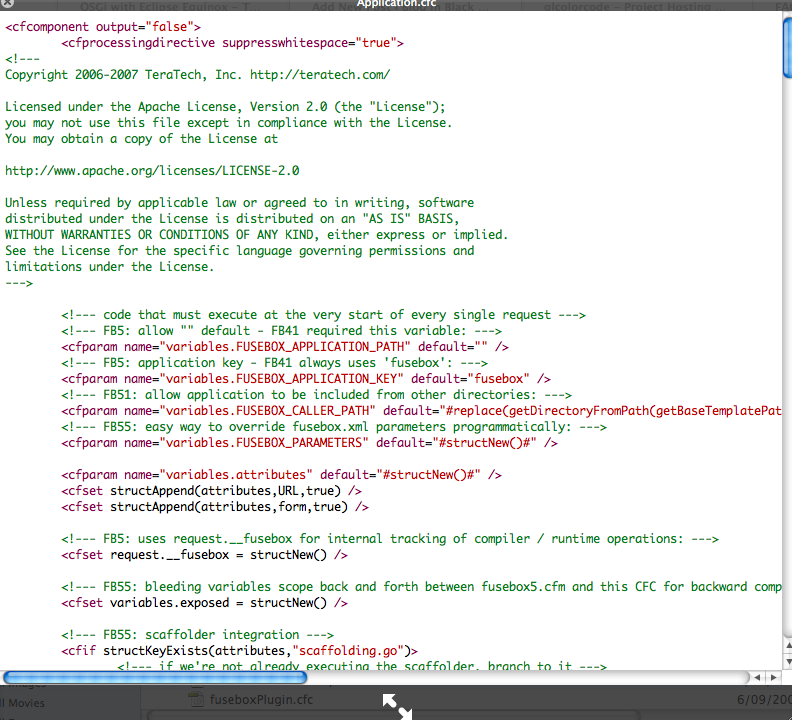
The other day then I found a quick look plugin named qlcolorcode that in fact does support CF. The installation is dead easy: you drop the QLColorCode.qlgenerator file in /Library/QuickLook (I wanted to make sure all my user accounts on my machine have access to it, in general it's supposed to work as well by dropping it into ~/Library/QuickLook).
The only potentially tricky issue could occur if you have XCode installed on your Mac. XCode comes with a quick look plugin for source code preview that might get triggered ahead of qlcolorcode. To disable the XCode plugin you can run the following code in Terminal:
f=/Developer/Applications/Xcode.app/Contents/Library/QuickLook/SourceCode.qlgenerator

sudo mv $f $f.disabled
If everything worked fine you should se a similar output as shown in the image.
The plugin actually seems to be quite flexible re other languages - more info is available in the FAQ. Actionscript and MXML come to mind ... :-)

2 comments
Dude, this is crazy cool. I'm a big user of QuickLook so I'm off to install qlgenerator. Thanks so much for posting this.
[...] few days ago I posted about using qlcolorcode to display syntax highlighted ColdFusion code in Mac OS X’s [...]